Stock Screener
- 4.2
- Rating
- 100.00K
- Installs
- Free
- Price

 Analysis by App-foxy
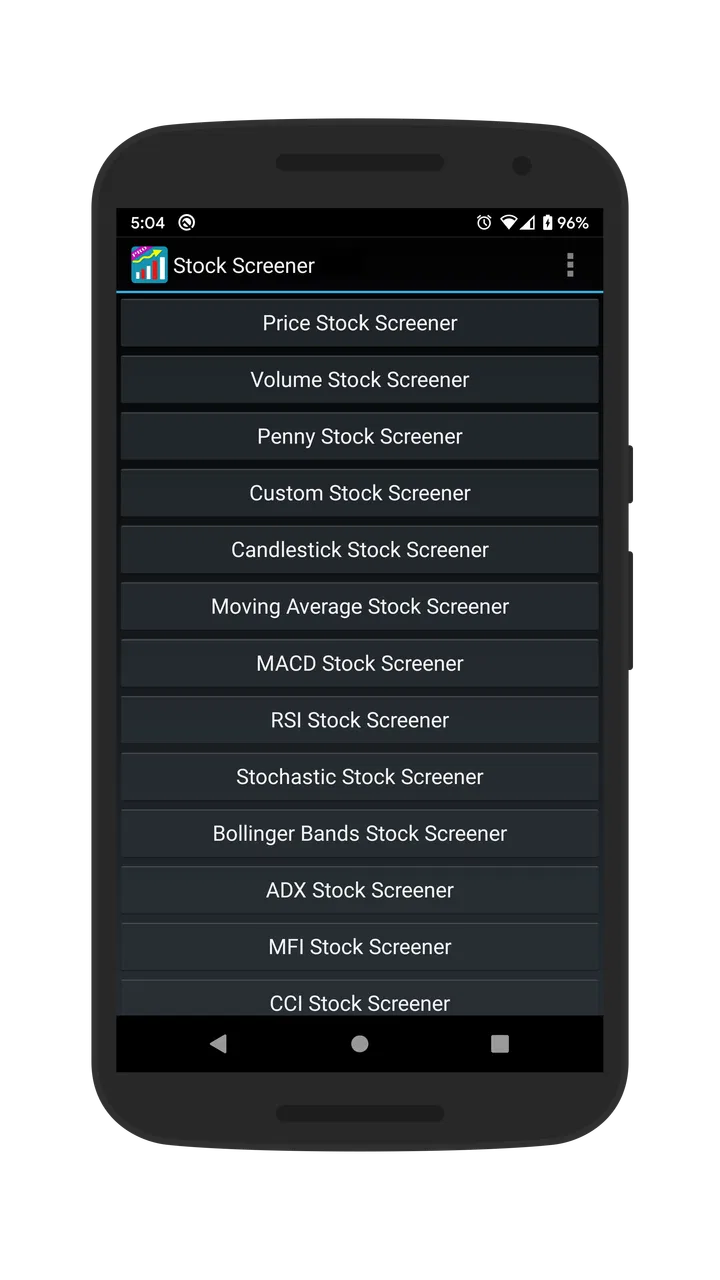
I tend to be cautious with stock apps that promise to simplify market research, because many of them either bury the useful tools under clutter or make screening sound easier than it really is. Stock Screener, from Financept, takes a more focused route. It is a finance app built around filtering US-market stocks with technical analysis, and after spending time with it, I see it as a practical first-pass research tool rather than a complete investing workstation.
That distinction matters. I would recommend it to someone who wants to narrow a large list of shares before doing deeper research elsewhere. I would not treat it as a substitute for a broker, a portfolio tracker, financial news source, or personal investment advice. Its value is in helping me ask better questions: which stocks match a particular technical setup, which names deserve a closer look, and which ideas can I remove quickly?
How Stock Screener fits into real household use
A realistic example is a shared tablet at home. One person may use it in the evening to review possible trades, while another family member uses the same device for unrelated tasks. In that situation, the app’s usefulness depends less on entertainment-style sharing and more on keeping expectations clear. A screening app is not something I would hand to a child as a casual learning game, even though its content rating is Everyone. The subject is still financial decision-making, and the consequences of acting on a bad interpretation can be serious.
You May Also Like

 Blood Strike: 2.5 Anniversary
Blood Strike’s Loadouts Turn Every Drop Into a Tactical Gamble
A close look at Blood Strike’s custom loadouts: how fast access to signature weapons reshapes its battle royale rhythm, rewards preparation, and narrows the gap between fights.

 Pandora - Music & Podcasts
Pandora’s Music Is Easy to Start, but Harder to Recover
Pandora’s strength is its low-effort path from a seed to a station. Its weak spot is how much confidence it asks you to place in connection, setup, and quiet recovery.

 8 Ball Pool
 Is Built on Rivalries, Rematches, and Routine
A close look at the rivalries, rematches, shared routines, and unanswered safety questions that turn a quick pool match into a persistent mobile community.

 Samsung Music
’s Quiet Strength Is Playing What You Already Own
Its reach comes less from spectacle than from dependable access to a personal library. That simplicity is both the app’s strongest retention engine and its ceiling.

 AccuWeather: Weather Radar
AccuWeather Review: A Quick, Clear Forecast for Everyday Decisions
For everyday plans, the best forecast is the one you can understand quickly. AccuWeather makes rain timing, radar, and local conditions easy to act on, with a few trade-offs.

 Hill Climb Racing
Why Hill Climb Racing Still Turns Crashes Into One More Run
A tiny car, a bumpy hill and one more upgrade: Hill Climb Racing keeps resurfacing because its simple chaos makes every near-miss feel personal.
More From Our News Desk



For an adult household, the app can support a simple routine. I might open it after work, apply a technical filter, make a short list, and then discuss those candidates with another adult before taking any action through a separate investing service. That separation is healthy: the app helps with discovery, while the final decision remains a deliberate process rather than an impulse caused by a flashing result or a persuasive chart.
It is also useful when two people have different levels of experience. A beginner can see how changing a filter changes the group of stocks under consideration, while a more experienced user can explain why a result is only a starting point. The important household rule is that a screen is evidence for further checking, not a shared instruction to buy or sell.
Because the app focuses on the US stock market, I would set expectations before installing it on a shared device. It is a better fit for a household following US-listed companies than for someone whose main interest is another country’s exchanges. That geographic focus can make the app feel pleasantly direct for the right user, but it also limits its usefulness for internationally diversified research.
Keeping setup practical and boundaries clear
The app is free to install, which makes trying it relatively low-risk from a budgeting perspective. It also includes optional in-app purchases ranging from $2.79 to $9.99 per item. In a shared household, I would make sure everyone knows that “free” does not necessarily mean every part of the experience has the same access conditions. I would also avoid letting a child or inexperienced user explore purchase screens without an adult present.
That is not a criticism unique to this app; it is simply sensible handling for any finance tool with optional paid items. The better question is whether the basic screening workflow is useful before spending anything. My approach would be to use the free experience first, learn how the filters behave, and only then decide whether an optional purchase solves a real problem. Paying for more access does not automatically improve the quality of an investment decision.
Stock Screener runs on Android devices using version 6.0 or later. That makes it suitable for many older phones and tablets, which is convenient if a household keeps a shared device for practical tasks rather than replacing it frequently. I would still check the screen size before choosing a tablet or phone as the main research device. Filtering and reading market information can be more comfortable on a larger display, while a small phone is better for a quick check than for a long session.
The current version is 2.29, and the app has been available since April 30, 2015. Those details suggest a product with a long presence rather than a brand-new experiment, but they should not be confused with a promise that every device or workflow will feel modern. My own test would be straightforward: open several screening views, change criteria, and see whether the results remain easy to interpret on the shared device everyone plans to use.
Coordinating research without mixing decisions
One of the less obvious strengths of a screener is that it can give a household a common starting point. Instead of one person saying, “I found a stock somewhere,” we can talk about the conditions that brought it into view. Was it selected because of a trend, momentum, price behavior, or another technical condition? That vocabulary makes discussion more concrete, even when the final opinion differs.
I would use a two-stage workflow. First, one person creates a narrow list with the app. Second, both adults review each candidate outside the initial screen by checking the company, recent developments, financial context, and the reason the trade might fail. This prevents the common mistake of treating a filter as if it had already completed the research.
A useful habit is to change only one filter at a time. If I alter several conditions simultaneously and the results change dramatically, I may not know which setting caused the difference. Working incrementally makes the screen easier to explain to someone else and helps reveal whether a result is robust or dependent on an overly specific combination.
I would also avoid turning the app into a household scoreboard. Comparing who found the “best” stock encourages hindsight and short-term thinking. A better shared goal is to record why a candidate was noticed and what still needs checking. That approach is especially important when one person has more market experience than another. The app can support coordination, but it cannot replace agreement about risk, time horizon, or how much money is actually at stake.
Another practical tip is to separate watchlist-style curiosity from action. A candidate that appears in a screen can be placed on a personal research list, then left alone until the original reason for interest is written down. If the reason cannot be explained clearly the next day, the idea may have been driven more by excitement than by a repeatable process.
Technical screening: where the app earns its place
The central experience is filtering stocks through technical analysis. I find that most useful when I already have a question. For example, I might want to find shares showing a particular type of price behavior, rather than scrolling through a huge market list without a plan. The app turns that broad search into a narrower set of names that I can inspect more carefully.
That is a meaningful advantage over manually checking stocks one by one. A general finance news app may be better for headlines, while a broker may be better for orders and account management. Stock Screener occupies a different position: it helps me organize a technical search before I move to those other tools.
The trade-off is that technical filters can create a false sense of precision. A clean result does not mean the stock is safe, undervalued, liquid enough for a particular strategy, or suitable for my finances. It only means the stock matched the selected conditions. I would therefore treat every result as a hypothesis. The app helps me find something to investigate; it does not prove that the investigation will end positively.
This is where I think the app is strongest for disciplined users and weakest for impatient ones. Someone who enjoys building a repeatable screening routine can get real value from it. Someone looking for a single answer to “what should I buy today?” is likely to be disappointed or, worse, overconfident.
For beginners, I would begin with broad filters and a small number of conditions. Starting with an elaborate screen can produce very few results and make it difficult to understand what each setting contributes. Once the basic workflow feels familiar, adding conditions one at a time is more educational than copying a complicated setup whose logic is unclear.
Age, trust, and responsible use
The Everyone age classification describes the app’s content category, but I would not interpret it as a recommendation for unsupervised investing by children. A young person can use it as a way to learn what screening means, provided an adult explains that market indicators are not guarantees. The trust issue is not whether a child can tap through the interface; it is whether they understand that a result can lead to real financial loss if acted on carelessly.
For teenagers learning about markets, I would keep the activity educational. They could compare how changing a technical condition affects the list, write down questions, and discuss why a company deserves further research. I would not connect that exercise to permission to trade or to a family member’s account. The app can be part of a lesson in uncertainty, but it should not become an authority figure.
For adults sharing a device, privacy boundaries still matter even when the app is not being used as a brokerage account. One person’s research habits, saved ideas, or screen preferences may not represent another person’s financial plans. I would agree on who uses the app, avoid making decisions from someone else’s session, and close the app when a research conversation is finished. Clear communication is more reliable than assuming everyone interprets the same screen in the same way.
Trust also means being honest about experience. If one household member understands technical analysis better, that person should explain the reasoning rather than presenting a filter as an unquestionable answer. A shared device can make the app accessible, but accessibility should not be confused with expertise.
How it compares with familiar alternatives
Compared with a broker’s built-in screener, this app is more appealing when I want a focused technical search without mixing the research step with an order button. A broker remains the better choice for checking holdings, available funds, execution details, and account-specific information. I would use Stock Screener before opening the broker, not instead of it.
Compared with a broad financial news app, it offers a different kind of efficiency. News services help me understand events and company narratives; this app helps me narrow the field using technical conditions. Neither approach is complete on its own. A stock that passes a technical screen still needs context, and a compelling news story may not fit the technical criteria I am studying.
Compared with a full desktop research platform, the app is likely to appeal to people who value a simpler mobile workflow. The compromise is depth and workspace. A desktop setup may be preferable for users who need several charts, notes, financial statements, and research windows open at once. Stock Screener makes more sense for short, focused screening sessions than for building an entire professional research environment.
That comparison also explains who should skip it. If I mainly invest through funds, focus on non-US markets, need portfolio accounting, or want automated alerts and execution in one place, I would look elsewhere. If I am a technical trader who already depends on advanced charting and detailed historical testing, I would probably want a more specialized platform alongside or instead of this app.
What I would do before relying on a result
My personal checklist starts with the filter itself. I ask what the selected condition is measuring, what time period it reflects, and whether it matches my intended holding period. A short-term technical signal should not be treated as a long-term company assessment. This simple distinction prevents one of the easiest errors a screening app can encourage.
Next, I would open a candidate in a separate research source and check the business, recent news, financial health, and risks. I would also consider whether the stock’s trading conditions fit the amount I plan to invest. A screen cannot decide whether a position is too large for my budget or whether I can tolerate a sharp decline.
I would record the date and reason for considering a stock, then revisit the idea later rather than acting immediately. That small delay is valuable because it shows whether the original thesis survives outside the excitement of discovery. If the idea changes, I learn something about the setup; if it remains interesting, I have a clearer basis for further work.
Finally, I would avoid assuming that a high-quality-looking result is unique. Filters can return several stocks with similar characteristics, and those names may move together. Diversifying the number of screened results is not automatically the same as diversifying risk. This is exactly the kind of judgment the app cannot supply for me.
My household verdict
Stock Screener is a sensible choice for an adult who wants a mobile tool dedicated to narrowing US stock ideas through technical analysis. Financept has kept the purpose clear, and the app’s free entry point makes it easy to test whether that workflow matches the way I research. Its average rating is 4.2 from around 2.7 thousand ratings, while more than 100 thousand installs show that it has found a substantial audience. Those figures are useful context, but my recommendation rests more on the app’s focused role than on popularity.
I would recommend it for a shared household when the boundaries are explicit: adults make the decisions, younger users treat it as an educational tool, and no one mistakes a screen for financial advice. It can help two people discuss the same candidates and build a calmer research routine, especially when one person wants a quick technical shortlist before doing deeper work.
I would skip it if I needed a complete investing service, broad international coverage, portfolio management, or a professional-grade research desk. The app is not trying to be all of those things, and forcing it into that role would create frustration.
My final view is positive but measured. I like Stock Screener as a filter between a vague market idea and a more serious investigation. Used patiently, it saves time and encourages clearer questions. Used as a shortcut to a buy decision, it becomes much less trustworthy. The best way to use it is as a searchlight, not as a steering wheel.
FAQs for Stock Screener
01What is Stock Screener and what can I use it for?
Stock Screener is an app designed to help investors search, filter, and compare publicly traded companies using criteria such as price, market capitalization, dividend yield, earnings growth, valuation ratios, trading volume, and technical indicators. After reviewing its tools, I found it most useful for narrowing a large market into a manageable watchlist. It supports research and idea generation, but it does not replace personal analysis or professional financial advice.
02Does Stock Screener provide real-time stock prices and market data?
The availability and speed of market data can depend on the specific version of Stock Screener, the exchange, and your subscription plan. Some information may be delayed, especially for certain markets, while other prices or indicators may update more frequently. Before making a trade, users should verify quotes, company announcements, and order details through their broker or an official exchange source. The app should be treated as a research tool rather than the sole source for live trading decisions.
03Can beginners use Stock Screener without investing experience?
Yes, beginners can use Stock Screener, but the number of filters and financial terms may feel overwhelming at first. New investors should begin with simple criteria, learn what metrics such as P/E ratio, revenue growth, debt, and dividend yield actually mean, and avoid selecting stocks based on a single result. The app can make research more organized, but it cannot determine whether an investment matches your goals, risk tolerance, or financial situation.
04Is Stock Screener free, or does it require a subscription?
Stock Screener may offer free access to basic screening functions while reserving advanced filters, additional market coverage, historical data, alerts, or detailed analysis for a paid plan. The exact features, prices, and trial conditions can change depending on the platform and region. Before downloading or subscribing, review the in-app purchase page carefully, including renewal terms, cancellation rules, and whether a free trial automatically converts into a paid subscription.
05Does Stock Screener let me buy or sell stocks directly?
Stock Screener is primarily intended for discovering and analyzing investment opportunities, not necessarily for executing trades. In most cases, users must open a separate account with a supported brokerage to purchase or sell shares. Even when the app displays prices, charts, or links to trading services, you should confirm that the broker is regulated and that all transaction costs, order types, and risks are clearly understood before placing an order.
Pros
- Filters stocks by price
- market cap
- sector
- and technical indicators.
- Quickly narrows large markets to find potential investment opportunities.
- Useful charts and financial data support faster research.
- Customizable screening criteria suit different trading strategies.
- Clean interface makes browsing and comparing stocks straightforward.
Cons
- Some advanced indicators or features may require a paid subscription.
- Data can be delayed
- depending on the selected market or exchange.
- Limited screening depth compared with professional desktop platforms.
- Too many filters may overwhelm beginners unfamiliar with stock analysis.
- Availability of markets and company data varies by region.

Stock Screener
Gallery